← All help topics

AI Chat

Conversations

Every chat a visitor has had with the assistant on one page, and the full text of any one of them. It is a record to read, not a place to answer from.

தமிழில் படிக்க

Steps

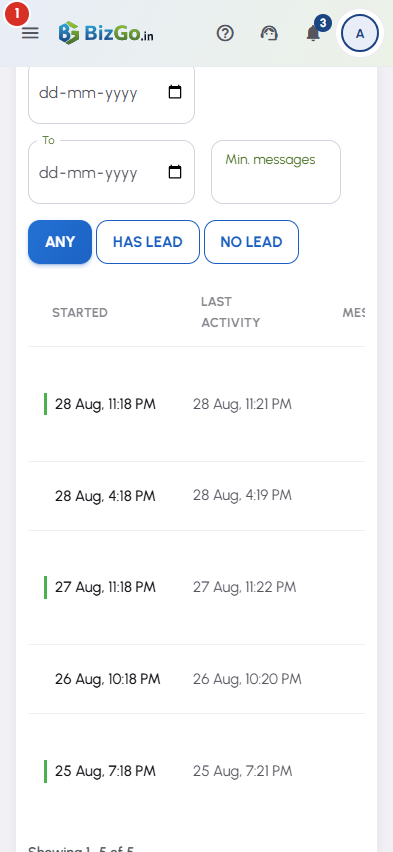
  1. The table lists conversations newest first: when it started, when it was last active, how many messages it ran to, any contact the assistant captured, and the page the visitor was on. A row with a green bar down its left edge produced a lead.
    Conversations — 1
  2. The controls above the table narrow the list on the server: a search of what was said, a From and To date, Min. messages, and Any, Has lead or No lead. Export CSV downloads exactly the set the filters are showing, and Clear filters puts the whole list back.

  3. Press Read at the end of a row to open the conversation itself — the captured contact, when it started and last ran, the visitor's IP address and the page they were on, then every message in order, with the assistant's side under the name you gave it.

  4. Times on both screens are Asia/Kolkata (IST). The list is paged by the server rather than in your browser, so a page holding thousands of conversations opens as quickly as one holding a handful.

  5. Transcripts are not kept for ever. BizGo keeps the text of a chat for a set period and then deletes it permanently; the period is stated in the Privacy Policy at bizgo.in/privacy-policy, in the AI Chat section. Any name, phone or email the chat captured is your own business record and is kept — it stays on the Leads screen. Export the CSV if you want a copy of the words as well.

Questions

Two things produce that and the screen cannot tell them apart. The transcript may have passed the retention period and been deleted — see the Privacy Policy at bizgo.in/privacy-policy — or the link may belong to a different page. Either way the lead it came from is untouched and still on your Leads screen.

No. There is no human takeover and no message box on this screen. Use the number or the email the assistant captured, or enrol the contact in a Review Engine campaign.

A conversation starts when a visitor actually sends a message. Opening the bubble does not create one, and neither does the greeting. If you cannot see the bubble at all, check the Show the chat widget on my page switch in Widget settings and that AI Chat is still live on the page.

It is kept with the transcript as part of the record, and it is deleted along with the transcript. BizGo's Privacy Policy tells a visitor this before they type.

No. One conversation is one visitor chat, however many messages it runs to, and follow-ups inside it are not counted again. Trying your own assistant from the Try it panel in Widget settings is not counted at all.

Related

Three Products, One Dashboard

Your page, your plan. The Review Engine and AI Chat come with Pro and Premium — manage every page from one dashboard.

Digital Business Page

Your whole business on one shareable link — logo, services, timings, location and contact. Live in minutes.

Learn more →

Review Engine

Runs a WhatsApp follow-up campaign for every customer you serve, until they leave you a Google review.

Learn more →

AI Chat

Answers your visitors 24/7, captures their name and phone, and drops every lead into your CRM.

Learn more →
WhatsApp