← All help topics

Review Engine

The Send queue

Every message this page owes a customer, written and waiting. You press send on each one yourself, from your own WhatsApp — BizGo never presses send for you.

தமிழில் படிக்க

Steps

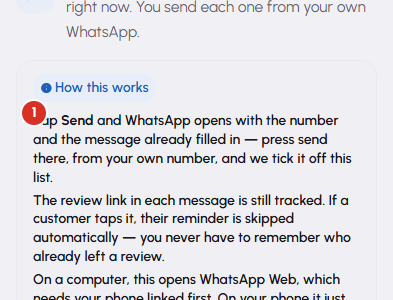
  1. Read the How this works note at the top once. It is the thing about this screen people are surprised by: the message is prepared for you here, and the send itself is a human action on your own phone.
    The Send queue — 1
  2. The three tiles say what is waiting: Ready to send, Due now, and Coming up today. The rows below carry the customer's name, their number, which step it is, and the full message text.

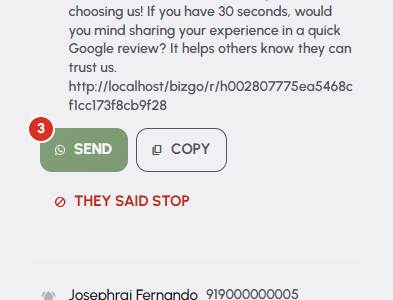
  3. Press Send on a row. WhatsApp opens with that number and that message already filled in. Press send there, in WhatsApp, from your own number — the row is ticked off this list at the same time. Copy takes the same text to your clipboard instead.
    The Send queue — 3
  4. The review link inside each message is tracked. If the customer taps it, their reminder is skipped for you, so you never chase somebody who has already left a review.

  5. If a customer has told you to stop, press They said stop on their row and confirm. Their campaign ends and the rest of their messages are cancelled immediately.

Questions

No. It writes the message, decides when it is due, and opens WhatsApp with the number and the text ready. Pressing send is yours. That is why the message reaches your customer from your own business number and not from a number they do not recognise.

That you opened WhatsApp with the message ready — nothing more. If you close WhatsApp without pressing send, the row is still ticked off. Nothing on this screen claims a message was delivered, because nothing here can know that.

Three things cover almost every case. Their next message is not due yet. You are outside the send window set for this page, and the rows unlock when it opens again. Or sending is paused in this page's Settings, which holds back even overdue rows. Nothing is lost in any of them.

The link opens WhatsApp Web, which needs your phone linked to it first. On a phone it simply opens WhatsApp.

No. One campaign is one credit, taken from this page's balance when the campaign started. However many of its up-to-three messages you end up sending, the cost does not change.

Related

Three Products, One Dashboard

Your page, your plan. The Review Engine and AI Chat come with Pro and Premium — manage every page from one dashboard.

Digital Business Page

Your whole business on one shareable link — logo, services, timings, location and contact. Live in minutes.

Learn more →

Review Engine

Runs a WhatsApp follow-up campaign for every customer you serve, until they leave you a Google review.

Learn more →

AI Chat

Answers your visitors 24/7, captures their name and phone, and drops every lead into your CRM.

Learn more →
WhatsApp