← All help topics

Review Engine

Review Engine settings

How this one business page's review requests read and when they become due. Another page has its own copy of this screen and shares nothing with it.

தமிழில் படிக்க

Steps

  1. Under Business identity, set Your first name and Business name — both appear in the message — and paste your Google review link. The hint under the field says how to find it from Google Maps or your Business Profile.
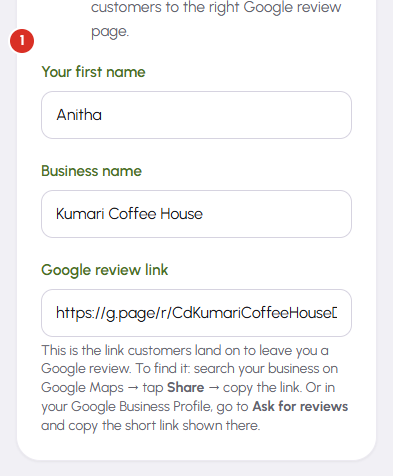
    Review Engine settings — 1
  2. Timing holds Review request delay, counted in hours after the check-in, and Reminder delay, counted in days. The reminder is skipped for anyone who has already tapped through to leave a review.

  3. Send window is the pair of times a message may become due. Anything scheduled outside it waits for the window to open again, so nobody is asked for a review in the middle of the night.
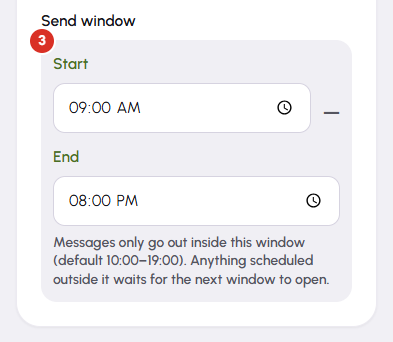
    Review Engine settings — 3
  4. Reactivation batch pace controls only how fast a reactivation batch drips out. It leaves the per-job check-in, request and reminder alone.

  5. Pause all sending holds everything for this page. Nothing queued is deleted and no credits are spent while it is on; turning it off brings the queue back, oldest first.

  6. Press Save settings. The Message preview beside the form updates as you type, before you save, so you can read the exact wording your customer will get.

Questions

The Send queue writes each message from this page's saved settings at the moment it shows it to you, so anything not yet gone picks up the new business name and the new review link. Messages you have already sent are unchanged.

No. There is one set of settings per business page, alongside its own contacts, credits and Google connection. Open the other page from the Review Engine overview and set it there.

The page is part of the screen's address. A dropdown here used to be able to re-point every future campaign of one business at another, so it was removed. Pick the business on the Review Engine overview instead.

It has to be a Google address — a google.com, g.page, g.co, share.google or maps.app.goo.gl link. Anything else is rejected, because that link is where your customers are sent.

The Send queue stops offering this page's messages, including ones already due, and it says so on the screen. Nothing is lost and nothing is charged while the pause is on.

Related

Three Products, One Dashboard

Your page, your plan. The Review Engine and AI Chat come with Pro and Premium — manage every page from one dashboard.

Digital Business Page

Your whole business on one shareable link — logo, services, timings, location and contact. Live in minutes.

Learn more →

Review Engine

Runs a WhatsApp follow-up campaign for every customer you serve, until they leave you a Google review.

Learn more →

AI Chat

Answers your visitors 24/7, captures their name and phone, and drops every lead into your CRM.

Learn more →
WhatsApp