Social Media
Today's post
Every day of the year there is a finished post waiting for this page — your logo, your name and your number already on it — and it costs nothing on any plan. This covers setting it up once, the four sizes and where each one goes, sharing it from your own phone, and the month of posts behind it.
Steps
-
The first time you open Today for a page, you get four short steps. Your brand is what gets printed on the picture — your logo, your business name, your phone number, your page address — and what kind of business it is. Your look is the frame: three styles, where it sits, and the colour. Today's post is the size you want first and the language and tone the caption is written in. Share it is the last step, and it is the real one: it puts today's post on your phone. Next saves that step and moves on, Skip moves on and keeps what BizGo already chose, and Skip setup on the first step keeps every default at once. Pressing Done at the end is what stops the four steps coming back; you can walk through them again whenever you want.
-
After that, Today is the screen. There is a post on it every single day of the year, and it is free — no AI credits, on every plan including the free one. It is made from this page's own details: the day's artwork when the date has some, and otherwise a card drawn from your own colours, with your logo, your name and your phone number on it either way. Nothing is generated for you overnight and nothing is charged; the post is built the first time somebody opens this screen for the day.
-
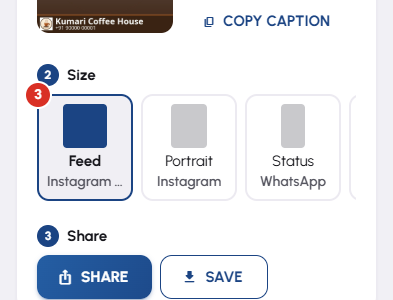
One post, four sizes, and the row across the middle is where you choose. Feed is the square one for Instagram and Facebook. Portrait is the taller 4:5 that fills more of an Instagram feed. Status is the full-height 9:16 for WhatsApp Status. Google is shaped for your Google Business listing. They are all the same post — the same picture and the same caption, cut and re-laid for where it is going — so picking one is not a decision you can get wrong. Occasionally one size is missing from an older post; that is ordinary and the others still work.
-
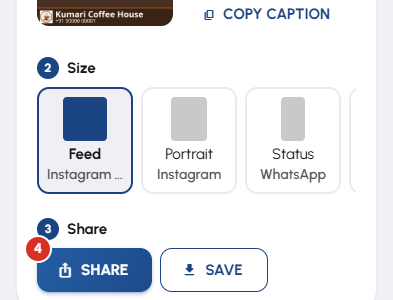
Share opens a short list of destinations rather than one button, and you pick where the post is going: WhatsApp Status, Instagram, Facebook, save every size to your phone, or copy the caption on its own. Choosing one hands your phone's own share sheet the right-shaped picture with the caption already attached, and you finish in WhatsApp or Instagram exactly as you would with any photo. One thing is worth reading twice: on Android the share sheet offers WhatsApp's Status beside its chat targets, so pick My status rather than the first name in the list. On a desktop browser there is no share sheet, so the rows become downloads instead and the file is named for where it was meant to go.
-
Once the 9:16 is on your WhatsApp Status, WhatsApp itself offers to put the same picture on your Facebook Story, and if you have turned on WhatsApp's own cross-posting your Status appears on Facebook and Instagram Stories as well. That is free reach on two more places for one tap, it is WhatsApp's feature rather than ours, and BizGo is not involved in it at all — which is also why nothing here can do it for you.
-
When a post has gone out, the screen says so: the heading becomes Today's post is out and the Share control stays exactly where it was, because putting the same post somewhere else is one more tap. The tick is about today only — tomorrow there is a new post and the screen asks again. Nothing is counted, nothing is scored, and skipping a day costs you nothing.
-
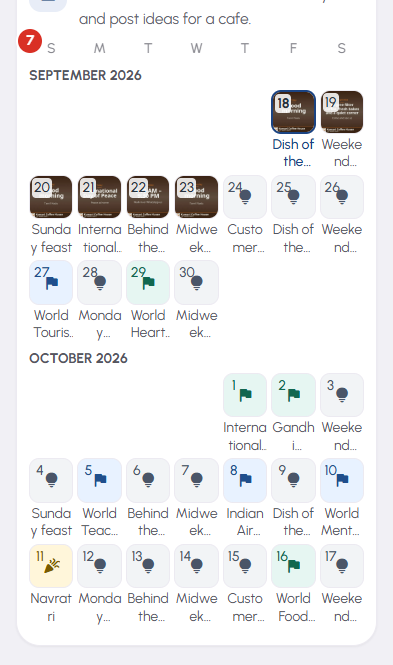
Calendar is the month behind Today. Every day is a thumbnail of that day's finished post, today is ringed, and a day you have already shared carries a tick. Tap any day to open it — the picture, the same four sizes and the same Share list, for that date rather than for today. The address in your browser carries the day with it, so a particular day can be bookmarked or opened again later. Getting a festival post ready the evening before is the whole reason this screen exists.
-
The rest of the rail is short. Library is every post this page has ever made, so an old one can be shared again. Settings holds the same look and caption choices the four steps asked for, as three panels with one Save, plus the switch that lets a post go to your Google Business listing. Buy Credits tops up this page's AI credits — the daily post never touches them, and the Studio is the only screen here that does.


