← All help topics

Account & tools

Subscriptions & billing

Every business page you own, the plan each one is on, when it comes up for renewal, and what you have paid. Plans belong to a page rather than to your account, so this screen is a list of pages.

தமிழில் படிக்க

Steps

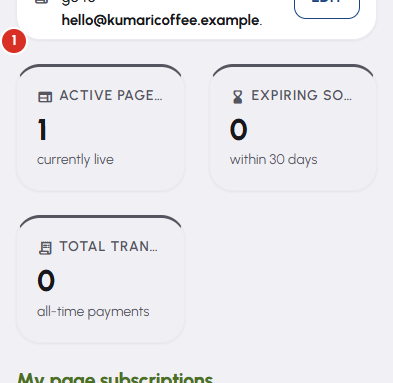
  1. The tiles across the top are the account's totals: Active pages, Expiring soon, and Total transactions. Everything under them is one page at a time.
    Subscriptions & billing — 1
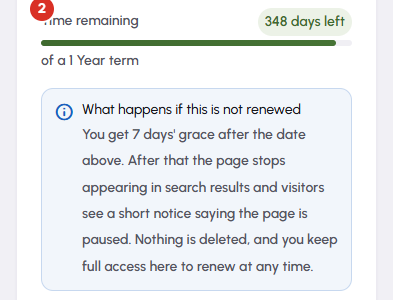
  2. My page subscriptions gives each page a card — its Current plan, Valid until, and Time remaining as a share of the term. The link under the page name opens the public page in a new tab.
    Subscriptions & billing — 2
  3. The note inside each card says exactly what happens to that page if the date passes: for most pages, a grace period, then it stops appearing in search results and visitors see a short notice saying the page is paused. Nothing is deleted, and you can always sign in and renew.

  4. The buttons at the foot of a card are the moves that page can make now — a plan to activate, Renew, or Upgrade to a larger plan. Each opens a confirmation naming the page, the plan, the term and the total, before anything is charged.

  5. Upgrading in the middle of a term is pro-rated. BizGo credits the unused portion of what you actually paid against the price, and the upgraded plan still starts a fresh full term — the unused time comes off the price, never on to the date. The confirmation itemises it as Unused time credit so you can see the total is the difference. Renewing and downgrading are not pro-rated; renewing early is still safe, because the new term is added to the date you already have rather than replacing it.

  6. Payment history lists every payment on the account. Search by page, plan or payment ID, narrow it by date, set how many rows you want, and take a receipt from a row once that payment has completed.

Questions

Because a plan is what a page is entitled to, and pages are independent. Two pages have their own renewal dates, their own allowances and their own history. Paying for one changes nothing about the other.

The unused part of what you paid for this page's current plan. It is one figure for the page, so it is the same whichever larger plan you choose — it is not a discount attached to a particular plan. It reduces what you pay today and it does not extend your date: the new term starts fresh from today.

On this page's own renewal date, not on the first of a month. A term runs from the day the plan was paid for to the date on the card, and renewing moves that date — moving it is exactly what starts the allowances again. AI credits run on the same clock but count monthly: they start again on that same date of every month, not on the 1st, and unused credits do not roll over.

No. Anything you bought outright — AI credits, campaign packs, conversation packs — never expires and is still there on that page. What stops is the allowance the plan included, because that belongs to a live plan. Renew and it comes back.

That is not settled on this screen. BizGo's published position is on its policy pages — see bizgo.in/refund-policy — and support will answer a specific payment. This help centre does not restate it, so read the policy rather than an article about it.

Related

Three Products, One Dashboard

Your page, your plan. The Review Engine and AI Chat come with Pro and Premium — manage every page from one dashboard.

Digital Business Page

Your whole business on one shareable link — logo, services, timings, location and contact. Live in minutes.

Learn more →

Review Engine

Runs a WhatsApp follow-up campaign for every customer you serve, until they leave you a Google review.

Learn more →

AI Chat

Answers your visitors 24/7, captures their name and phone, and drops every lead into your CRM.

Learn more →
WhatsApp