← All help topics

Business page

The visiting card

A printable business card built from the details already on your page. Lay it out here, then download it as an image or a print-ready PDF.

தமிழில் படிக்க

Steps

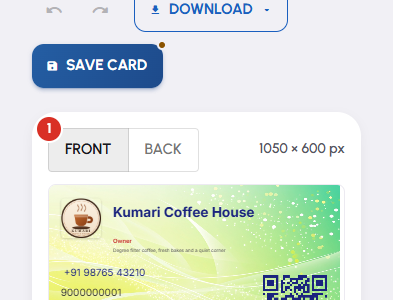
  1. The card is on the left and its controls on the right. Front and Back switch which side you are working on, and the size of the canvas is printed beside them.
    The visiting card — 1
  2. Templates is the quickest start — pick one and the whole card is laid out for you. If nothing is listed, build from scratch instead.

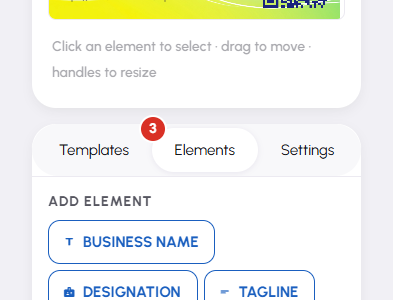
  3. Elements is where you add pieces: Business Name, Designation, Tagline, Phone, Email, Website, WhatsApp, Logo and QR Code. Click a piece on the card to select it, drag to move it, use the handles to resize, and the panel below to set its font, colour and shadow.
    The visiting card — 3
  4. Settings covers the whole card — Orientation, background as a solid colour, a gradient or an image, and the default font. Undo and Redo are in the header if a change goes wrong.

  5. Press Save Card when you are happy. A small mark on the corner of that button means you still have changes that are not saved.

  6. Download offers Download Front, Download Back, and Download PDF for both sides. Turn on the bleed and crop-marks switch in that menu if a printer has asked for it.

Questions

From the page itself. The card reads that page's business name, tagline, logo, phone, email, designation and website. Change them in the page editor and the card follows.

Your public page. Someone scanning the printed card lands on the same address the card is built from, so they get your live details rather than whatever was true on the day it was printed.

No. The card is a separate artwork that borrows the page's details. Saving it changes nothing your visitors see.

The PDF, with the bleed and crop-marks switch on. The front and back images are better suited to WhatsApp, email and social posts.

Each page has its own card. Use the page name under the title to switch to another page, or reach the card from that page's own screen with the Card button.

Related

Three Products, One Dashboard

Your page, your plan. The Review Engine and AI Chat come with Pro and Premium — manage every page from one dashboard.

Digital Business Page

Your whole business on one shareable link — logo, services, timings, location and contact. Live in minutes.

Learn more →

Review Engine

Runs a WhatsApp follow-up campaign for every customer you serve, until they leave you a Google review.

Learn more →

AI Chat

Answers your visitors 24/7, captures their name and phone, and drops every lead into your CRM.

Learn more →
WhatsApp