← All help topics

Review Engine

Reactivation batches

A way to go back to customers you served a while ago and ask them for a review, spread out over days instead of all at once. It works from this page's contact book.

தமிழில் படிக்க

Steps

  1. Under 1. Select contacts, choose who is in the batch. Tick people by hand, press Select all untagged contacts, or open Or filter your audience to pick by tag, source, when they were added, or never messaged. The three ways are exclusive — using one clears the others.
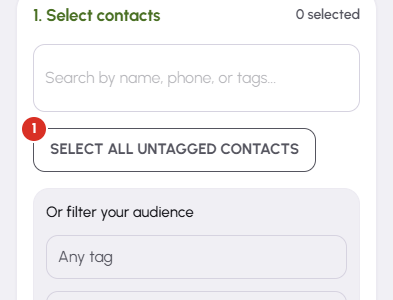
    Reactivation batches — 1
  2. Press Preview. Nothing is written yet: 2. Review & start appears with how many contacts are eligible, how many were excluded for opting out or for already being in a campaign, and how many campaigns the batch needs.
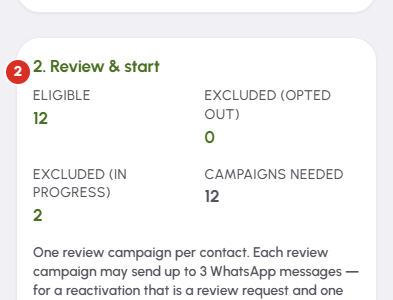
    Reactivation batches — 2
  3. The line under those tiles works out when the last request in the batch comes due, from the pace and the send window set in this page's Settings. Press Start reactivation when it reads right.

  4. While a batch runs, Batch in progress shows how far it has got. Stop batch cancels only what is left of this batch — it does not touch your other campaigns or the pause switch.

  5. Batch history keeps every batch you have run. Click a row for the per-contact detail, or use the download icon to export that batch as a CSV.

Questions

A reactivation campaign has no check-in. It is a review request and one reminder, aimed at somebody whose job finished a while ago. The cost is the same: one campaign, one credit, per contact.

Yes. A batch schedules the messages and paces them out so they do not all land at once. Each one appears on the Send queue when it is due, and you open WhatsApp and press send there.

You can still start. The contacts you have credits for are scheduled and the rest are skipped. Top up from the balance panel at the top of the screen — credits belong to this page, not to your account.

Yes. Reactivation batch pace is in this page's Settings. It only affects batches; the per-job check-in, request and reminder are unaffected.

Everything still queued was cancelled, and any campaign that had not started yet went back to this page's balance. Messages already sent stay sent, and those credits stay spent.

Related

Three Products, One Dashboard

Your page, your plan. The Review Engine and AI Chat come with Pro and Premium — manage every page from one dashboard.

Digital Business Page

Your whole business on one shareable link — logo, services, timings, location and contact. Live in minutes.

Learn more →

Review Engine

Runs a WhatsApp follow-up campaign for every customer you serve, until they leave you a Google review.

Learn more →

AI Chat

Answers your visitors 24/7, captures their name and phone, and drops every lead into your CRM.

Learn more →
WhatsApp